Preview unavailable. View source
dimensional-drawing: Apple-style spec sheets of your UI
Coding Agent Skills
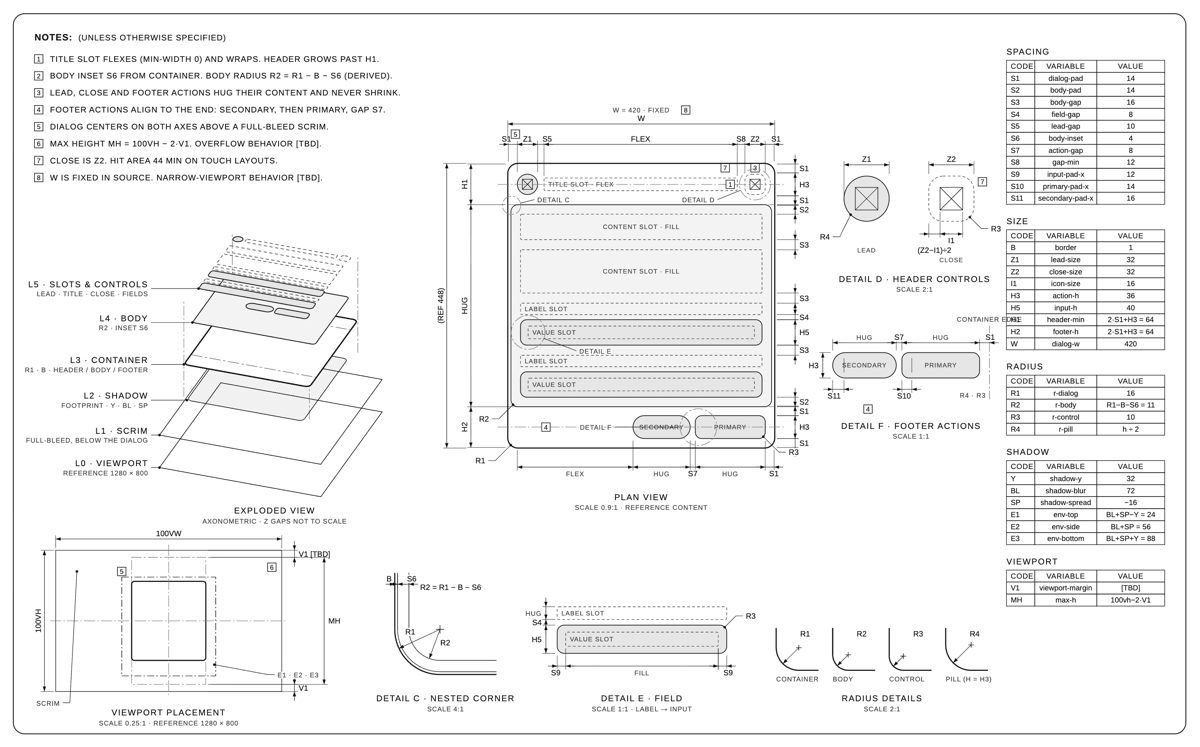
Point your agent at a card, dialog or other component and get a one-page technical drawing of it, like Apple's accessory drawings: plan view, exploded layers, detail circles and tables of paddings, gaps and radii. A second skill animates the sheet drawing itself.
Install command
npx skills add enesozturk/dimensional-drawing
git clone https://github.com/enesozturk/dimensional-drawing
cp -r dimensional-drawing/skills/* ~/.claude/skills/
Agent prompt
Use the "dimensional-drawing: Apple-style spec sheets of your UI" skill for my current task.

GitHub source: https://github.com/enesozturk/dimensional-drawing

Fetch this source and read its README, applicable SKILL.md files, and referenced instructions before using it.

Add the relevant skill to your own supported skills directory or use the documented installation method. Check the source and permissions before running any setup commands.

Published installation command: npx skills add enesozturk/dimensional-drawing
git clone https://github.com/enesozturk/dimensional-drawing
cp -r dimensional-drawing/skills/* ~/.claude/skills/

Apply the skill to my current project: Point your agent at a card, dialog or other component and get a one-page technical drawing of it, like Apple's accessory drawings: plan view, exploded layers, detail circles and tables of paddings, gaps and radii. A second skill animates the sheet drawing itself.

Follow the repository instructions, make the required changes, and verify the result. If my intended task is missing, ask me to describe it first.
Agents: Claude Code, Codex, Cursor, Claude